
What this page helps with
Common problem
FFmpeg commands are powerful but hard to maintain when paths, audio devices, bitrate, codec and keyframe settings change often.
StreamerPro solution
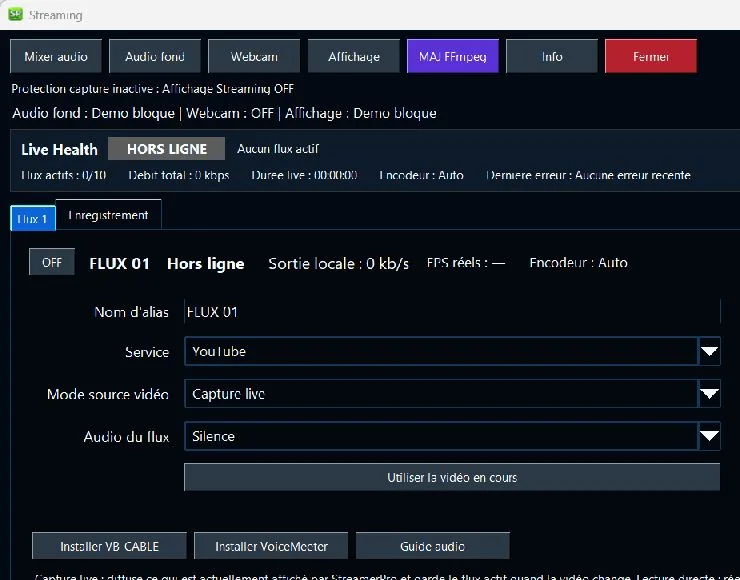
StreamerPro exposes the important FFmpeg settings in a Windows interface and keeps profiles, audio, bitrate and diagnostics easier to reuse.
Concrete use case
An operator tests 1080p30 or 4K settings, checks audio bitrate and keeps upload margin before starting a long-running RTMP stream.
Quick questions
Do I need to know FFmpeg commands?
Not for common settings; StreamerPro exposes the useful controls.
Which codec should I choose?
H.264 is the safest option, while H.265 depends on compatibility.
Can I record locally?
Yes, local recording is part of StreamerPro workflows.
FFmpeg without rebuilding commands every time
FFmpeg is powerful, but long command lines are easy to break. A wrong path, wrong audio source, unstable bitrate or unsuitable codec can be enough to interrupt a live workflow.
StreamerPro keeps FFmpeg inside a repeatable Windows interface, so you can focus on source files, profiles, bitrate, FPS, audio and monitoring.
Useful FFmpeg starting points
| Use case | Codec | Resolution | FPS | Suggested bitrate |
|---|---|---|---|---|
| Light test | H.264 | 720p | 30 | 2500-4500 kb/s |
| YouTube standard | H.264 | 1080p | 30 | 6000-9000 kb/s |
| High quality | H.264 | 1440p | 30 | 9000-13000 kb/s |
| YouTube 4K | H.264 / H.265 | 2160p | 30 | 15000-25000 kb/s |
Practical notes
Related English pages
FAQ
Does StreamerPro replace FFmpeg?
No. It uses FFmpeg and gives it a more practical Windows workflow for streaming and recording.
Can I use H.265?
Yes, where your hardware, platform and target workflow support it. H.264 remains the most compatible option.
Can it help with audio issues?
It can help organize audio routing and diagnostics, but final stability depends on the Windows audio chain and streaming platform requirements.
StreamerPro Video Converter
StreamerPro Video Converter
Prepare videos before streaming with the built-in FFmpeg converter: H.265 to H.264, 4K UHD, CBR, AAC audio, progress tracking and FFmpeg log.