
Verify the file before installation
In PowerShell, adjust the path to the folder where you saved the file, then calculate its SHA256:
Get-FileHash "$env:USERPROFILE\Downloads\StreamerPro_Setup_v3.56.26.exe" -Algorithm SHA256
Get-FileHash "$env:USERPROFILE\Downloads\StreamerPro_Portable_v3.56.26.zip" -Algorithm SHA256
Compare the result with the checksum for the same file shown on this page. If it differs, do not run the file and download it again from the official site. A matching checksum verifies integrity; it does not replace the publisher’s digital signature.
What you can test for free
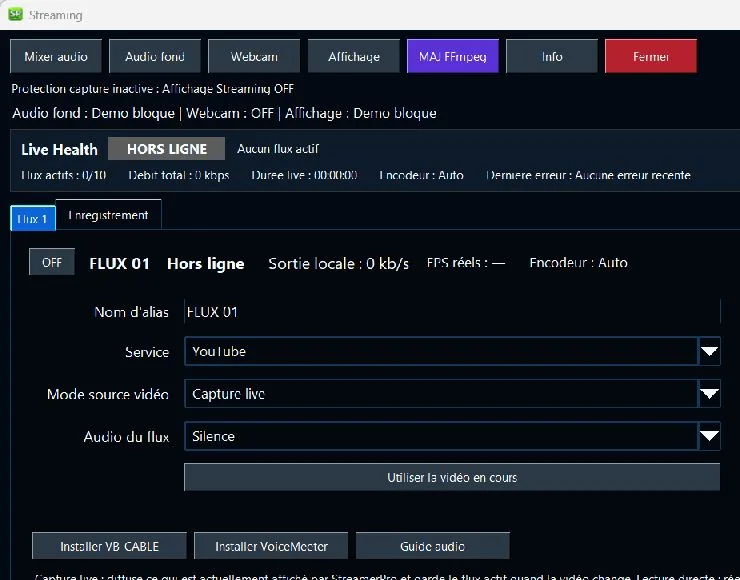
Local 4K playback depends on the PC and media. Demo streaming is limited to 1 stream, 1280 × 720, 4,500 kbps and 30 FPS. An active license unlocks reserved features and up to 10 streams / 4K depending on the configuration. Demo recording offers Source without resizing, up to 30 FPS.
Compare all 43 Demo / License featuresWhat this page helps with
Common problem
Visitors need to know which installer is official, whether their Windows PC is supported and what they can test before paying.
StreamerPro solution
This page keeps the official StreamerPro installer, version details, download path and links to documentation and licenses in one place.
Concrete use case
A creator downloads the free demo, tests a 4K playlist, checks audio and RTMP settings, then decides whether the full license fits the setup.
Quick questions
Is the demo free?
Yes, the demo can be downloaded before buying.
Which version should I use?
Use the official v3.56.26 installer for a standard installation, or the 64-bit portable version if you prefer extracting StreamerPro into a local folder without a traditional installer.
Where are the setup instructions?
The documentation page covers installation, license, FFmpeg and YouTube Live.
Secure download
Choose your StreamerPro version
Choose the version that fits your workflow: standard Windows installer or 64-bit portable ZIP archive.
Windows installer
For a standard StreamerPro installation on Windows.
SHA256B600D51073F6639B550E2D047A041D5AE34E80B86E299348888EC956EC55E722
64-bit portable version
ZIP archive to extract into a local folder, with no traditional installer.
SHA256DA626E0CC42CB78025D0443D147817C315C51D7B65B6277610BDBE4DA0D90594
What you can test
Before purchase
The demo is made to validate your real machine. Test your GPU load, upload stability, audio chain, video files and long-duration behavior before buying a fixed-duration license with no automatic renewal.
After payment is validated, your StreamerPro activation key is sent to the email address used for the order.
Related English pages
FAQ
Is payment required for the demo?
No. You can download the demo and test your setup before buying.
Where is the official installer hosted?
Only on streamerpro.fr. Avoid downloading StreamerPro from unofficial sources.
Can Windows SmartScreen appear?
Yes. Windows may show a SmartScreen warning for recent or unsigned applications. Check that the file comes from streamerpro.fr.
StreamerPro Video Converter
StreamerPro Video Converter
Prepare videos before streaming with the built-in FFmpeg converter: H.265 to H.264, 4K UHD, CBR, AAC audio, progress tracking and FFmpeg log.
Free complementary tool
PDS Batch Exporter automates PowerDirector .pds batch exports before preparing playlists or broadcasting with StreamerPro.