
Windows installer
For a standard StreamerPro installation on Windows.
SHA256B600D51073F6639B550E2D047A041D5AE34E80B86E299348888EC956EC55E722
Compatible Windows 10 / 11 — 64-bit (x64) required
Does your 24/7 live stream cut out, freeze or require too much tinkering?
StreamerPro turns a Windows PC into a 24/7 video station for digital signage, storefront screens and YouTube Live. Launch 4K playlists, logos, webcam, screen capture and RTMP streaming without juggling OBS, VLC, FFmpeg or manual scripts.
Choose the version that fits your workflow: standard Windows installer or 64-bit portable ZIP archive.
For a standard StreamerPro installation on Windows.
SHA256B600D51073F6639B550E2D047A041D5AE34E80B86E299348888EC956EC55E722
ZIP archive to extract into a local folder, with no traditional installer.
SHA256DA626E0CC42CB78025D0443D147817C315C51D7B65B6277610BDBE4DA0D90594
Free demo — no payment required — test your PC before purchase. Licenses start at €20, with no automatic subscription.
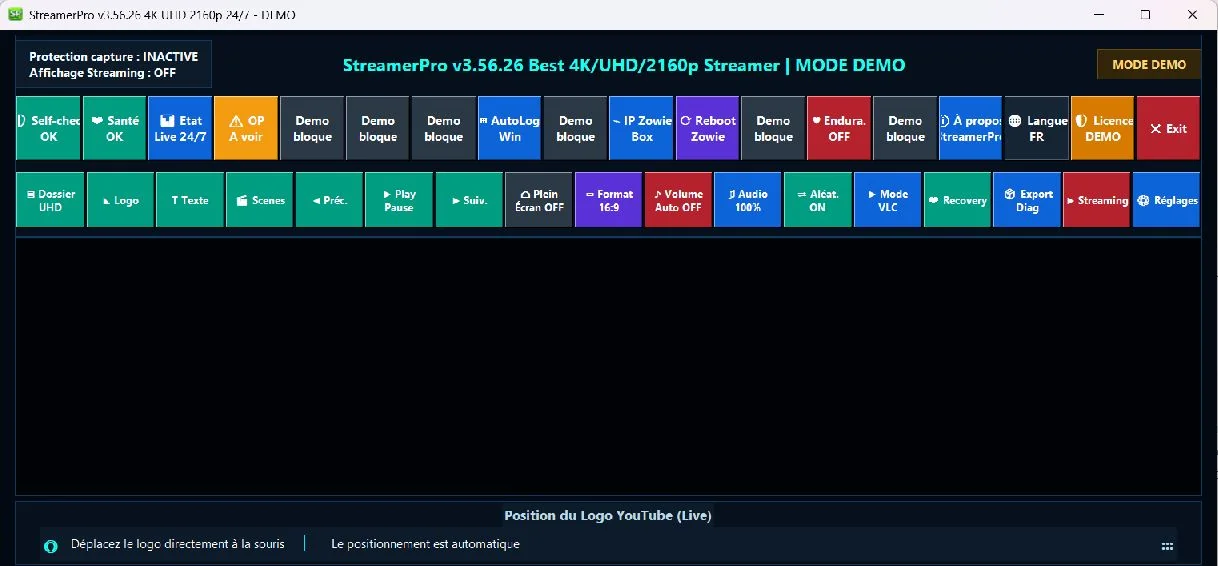
Up to 10 simultaneous streams depending on PC power, GPU, resolution, codec, bitrate and network stability. Not guaranteed on every configuration.
OBS alternative 24/7
OBS is excellent for manual live production. StreamerPro targets permanent streams: playback, playlists, FFmpeg, overlays, diagnostics and automatic recovery are grouped to avoid scripts and manual restarts.
Digital signage on a Windows PC
Unlike a closed signage box, StreamerPro runs on a standard Windows PC: easier to modify, easier to troubleshoot, and compatible with your files, NAS, webcams, audio interfaces and existing tools.
Compare with hardware signage playersKeep control over hardware, updates, codecs and connected devices.
Local videos, network folders and playlists remain easy to organize.
Add webcam, screen capture, audio, logos and RTMP streaming when needed.
A Windows workstation is easier to inspect, diagnose and adjust on site.
Local cost vs cloud
For several 4K streams, cloud platforms billed every month per stream quickly become expensive. StreamerPro Windows RTMP uses a local PC, your drives or NAS, your overlays, a ZowieBox and a fixed license.
Windows PC + SSD/NAS + StreamerPro + ZowieBox + YouTube Live 4K. A local station designed for your files, sources, overlays and RTMP streams.
Local StreamerPro: 90 € annual license, hardware excluded. Calculation hypothesis on 18 June 2026: cloud at 99 €/month/stream, or 4,752 €/year for 4 streams. This simulation illustrates one possible scenario; real costs depend on hardware, selected cloud provider and 4K usage.
What this page helps with
A 24/7 video stream becomes fragile when the playlist, player, FFmpeg, OBS, overlays, audio and restart logic are managed separately.
StreamerPro brings local playout, 4K playlists, RTMP, FFmpeg, VLC/MPC-BE, overlays, diagnostics and recovery into one controllable Windows station.
A YouTube 24/7 channel, visual radio or storefront screen can run from a local PC, NAS or capture source, with a free test before purchase.
Yes. The main approach is based on a local Windows PC, your files and your streaming settings.
Yes. The free demo helps you check your PC, files, bitrate and audio before buying.
Video demo
Watch how to quickly prepare a 24/7 YouTube Live channel with StreamerPro: video sources, playlist, broadcast and essential settings.
Live YouTube broadcast
The screenshot illustrates the interface, not the live stream status. Check the current status on YouTube.
Real demo: this YouTube live stream runs with StreamerPro.exe on a local Windows PC.
In this demonstration, a ZowieBox is used for the field setup, but StreamerPro can also run standalone with built-in local features, webcam, screen capture, VLC/MPC-BE and FFmpeg depending on your configuration.
Video playlist, RTMP, overlays and 24/7 broadcasting without a per-stream cloud service.
Who is it for?
Designed for PCs that must broadcast for long periods with local, network or capture sources, without constant supervision.
Problem solved
One console drives playback, the stream, overlays and recovery actions.
YouTube channels, music lives, video playlists and visual radios running continuously.
Audio playback with visualization, logos, text and automated live broadcasting.
Hotels, bars, receptions, public screens and workstations that need to stay stable.
4K drones, webcams, NAS, ZowieBox and local content organized as playlists.
Preview
The main screen gives access to players, playlists, overlays, live controls and diagnostics without multiplying tools.
Key points
The key tools to prepare, monitor and recover a continuous broadcast.
Integrated players and encoder help you move quickly from a local playlist to a live or radio broadcast.
Choose the player directly depending on the workstation, codec and desired broadcast behavior.
Add text on the desktop and over videos, alongside mouse-positioned logos.
When an audio file plays with VLC selected, StreamerPro displays an animated fractal window.
The local playlist can update automatically from a connected NAS.
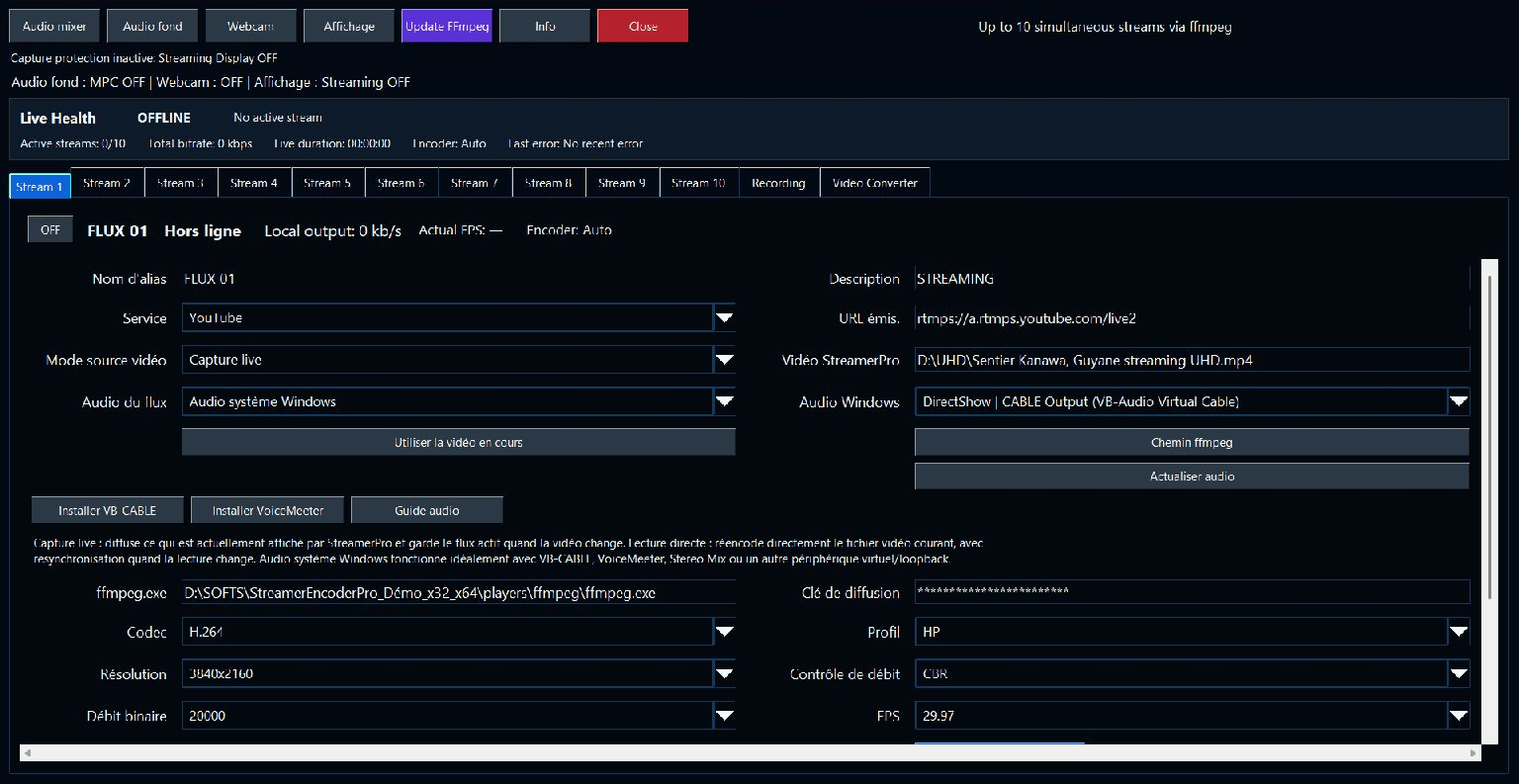
New local recording
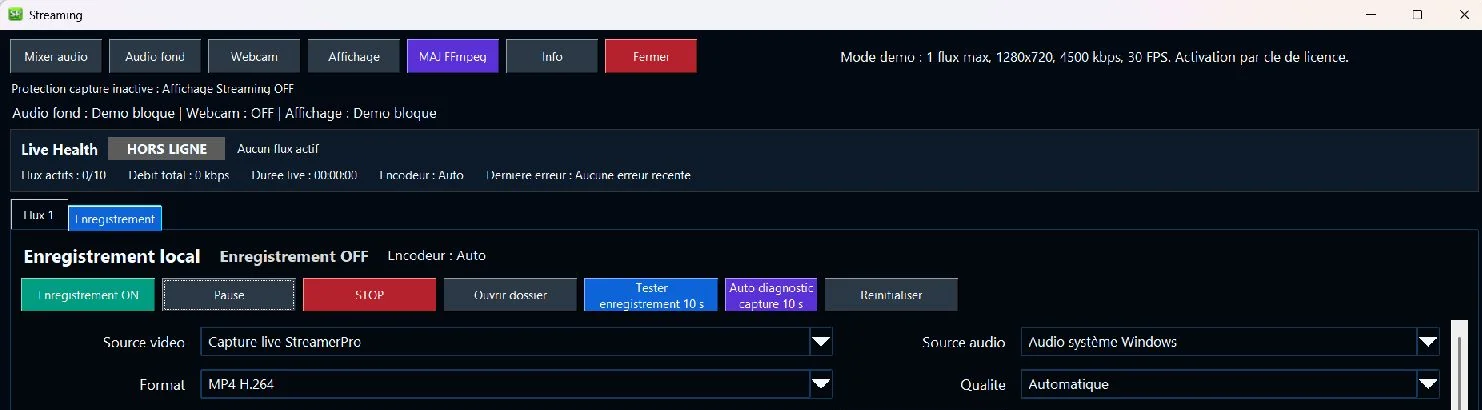
StreamerPro can record the current capture through FFmpeg, with pause, stop, folder selection, MP4/MKV H.264/H.265, MOV H.264, WAV/MP3 audio-only, resolution, FPS, bitrate and audio source.
Configurable recording folder
Resolution up to 3840x2160 and controlled bitrate
Pause, stop and clean file restart
Features
VLC or MPC-BE, H.264/H.265 videos, source aspect ratio and fullscreen.
Automatic rotation, random mode, previous/next controls and network monitoring.
Custom overlays kept above the player during playback.
Outputs such as YouTube, Twitch, Facebook Live, Kick, TikTok, Vimeo or Restream through FFmpeg.
Live capture to a local file through FFmpeg with pause, stop, MP4/MKV H.264/H.265, MOV H.264, WAV/MP3 audio-only, adjustable resolution, FPS and bitrate.
VLC/MPC-BE freeze detection, health checks and diagnostic export.
Autostart, autologon, PC performance mode, scheduled reboot and ZowieBox.
StreamerPro encoding demo
The demo version adds a complete encoding panel: live capture of the current display, direct playback, per-stream profiles, system audio, microphone, webcam and real-time levels.
In demo mode: 1 stream, 1280x720, 4500 kbps, 30 FPS. AutoStart, PC restart, NAS, ZowieBox, Autologon, manual Streaming Display and MPC background audio are reserved for the full license.
Automatic detection of the available encoder: NVIDIA, AMD, Intel or CPU depending on the configuration.
Configurable codec, profile, resolution, bitrate, FPS and I-frame interval.
Webcam window with saved position and size for repeated live sessions.
Master, Windows, video, microphone and webcam with real-time 0-100% levels.
Installation
The local version bundles StreamerPro, VLC, MPC-BE, FFmpeg, Autologon tools, the PowerShell watchdog and performance options for broadcast PCs.
Compatibility: Windows 10 / 11, 64-bit (x64) required. These files do not support 32-bit Windows.
File: StreamerPro_Setup_v3.56.26.exe
Shortcuts, Windows startup, performance and scheduled tasks.
UHD folder, NAS, logos, streaming profiles, webcam and audio mixer.
Windows security
The official StreamerPro file is distributed only from streamerpro.fr. Always check the website address before downloading or installing the software.
SHA256 is a unique fingerprint of the file. If the file is modified, its fingerprint changes. It helps verify that the downloaded installer matches the official file.
Download StreamerPro only from the official website. Version 3.56.26 is the recommended official release.
Windows may show a SmartScreen warning because StreamerPro is a recent application. The official file is available only on streamerpro.fr and its SHA256 fingerprint is published for verification.
StreamerPro 3.56.26
Real StreamerPro 3.56.26 screenshots: Demo console and Recording panel (20 October 2026), licensed Streaming panel (22 October 2026). See each caption for the date, selected language and displayed state.
Demo and license
Try StreamerPro for free, then unlock production features with an active license. Here are the differences in version 3.56.26.
| Feature | Free demo | Active paid license |
|---|---|---|
| Live streaming | ||
| Simultaneous streams | 1 stream | Up to 10 streams |
| Streaming resolution | 1280 × 720 (720p) | 720p, 1080p, 1440p, 4K UHD |
| Streaming frame rate | Up to 30 FPS | Up to 60 FPS |
| Streaming video bitrate | Up to 4,500 kbps | Configurable per profile |
| YouTube, other services and custom RTMP/RTMPS server | Included | Included |
| H.264 / H.265, CBR / VBR and CPU / GPU encoding | Hardware dependent | Hardware dependent |
| Streaming profiles, presets and pre-live checks | Included | Included |
| Stream reconnection and monitoring | Included | Included |
| Playback and presentation | ||
| Local video / audio playlists and folders | Included | Included |
| Local 4K and fullscreen playback with VLC / MPC-BE | Hardware dependent | Hardware dependent |
| Play, pause, next / previous, looping and shuffle | Included | Included |
| Logos, text, images / GIFs and date / time overlays | Included | Included |
| Audio visualization and visual radio | Included | Included |
| French, English, Italian, Spanish and German interface | Included | Included |
| Capture, webcam and audio | ||
| Desktop, window, region and multi-monitor capture | Included | Included |
| Webcam and live video sources | Included | Included |
| Live menu, integrated player and chat tools | Included | Included |
| Audio mixer, Windows sound, microphone, webcam and level meters | Included | Included |
| Independent MPC background audio | Requires a license | Included |
| Manual Streaming display | Requires a license | Included |
| Recording and conversion | ||
| Local MP4 / MKV / MOV recording and WAV / MP3 audio | Included | Included |
| Recording resolution | Source, without resizing | Source, 1080p, 1440p, 4K UHD |
| Recording frame rate | Up to 30 FPS | Up to 60 FPS |
| Duration, file splitting and disk monitoring | Included | Included |
| Integrated video converter | Requires a license | Included |
| Automation and operation | ||
| Automatic startup with Windows | Requires a license | Included |
| Automatic PC restart | Requires a license | Included |
| Windows Autologon tool | Requires a license | Included |
| Synchronization from a NAS | Requires a license | Included |
| ZowieBox configuration | Requires a license | Included |
| Manual ZowieBox restart | Requires a license | Included |
| Scheduled ZowieBox restarts | Requires a license | Included |
| 24/7 Kiosk mode | Requires a license | Included |
| Player monitoring and recovery | Included | Included |
| Protection and maintenance | ||
| Client lock | Requires a license | Included |
| Profile lock | Requires a license | Included |
| Normal log mode | Included | Included |
| Diagnostic and Silent / Quiet Production log modes | Requires a license | Included |
| Diagnostic export and health report | Included | Included |
| Configuration backup, import and export | Included | Included |
| Update checks and downloads | Included | Included |
| Stable / Beta update channel selection | Requires a license | Included |
| Restore the previous version (rollback) | Requires a license | Included |
The 720p limit applies to streaming, not local playback. Demo recording offers “Source” without resizing and up to 30 FPS. 4K, higher frame rates and simultaneous streams depend on the PC, GPU, media, network and platform. ZowieBox and NAS require the corresponding hardware; rollback requires an available backup. Chats require accounts and access to the relevant platforms.
View licensesBefore payment
Yes. Download the free demo to check your PC, videos, audio, network and settings before purchase.
No. Licenses are fixed-duration: 1 month, 3 months, 6 months or 1 year. There is no automatic renewal.
Yes, StreamerPro can prepare profiles up to 3840x2160 depending on your PC, GPU, files and upload bandwidth.
Yes. StreamerPro is designed for local playlists, video folders, 4K content and updates from a connected NAS.
Stripe payment
One-time secure payment by Stripe. The site never stores card numbers and redirects to Stripe Checkout to complete the license purchase.
Secure payment via Stripe. No card number stored on streamerpro.fr.
Version 3.56.26 available
Download StreamerPro only from the official website. Version 3.56.26 is the recommended official release.
After payment validation, an email containing the StreamerPro activation key will be sent to this address. Check it carefully.
The email will be passed to Stripe and locked on the payment page to avoid a typing mistake.
A simple license, with no automatic subscription, to turn your Windows PC into a 24/7 broadcast station.
20 €
Equivalent to 20 €/month
1-month license
One-time payment. License valid for 1 month. No automatic renewal.
Compatible with Windows 10 / 11 — 64-bit (x64) required
These files do not support 32-bit Windows.
40 €
Equivalent to 13.33 €/month
3-month license
One-time payment. License valid for 3 months. No automatic renewal.
Compatible with Windows 10 / 11 — 64-bit (x64) required
These files do not support 32-bit Windows.
60 €
Equivalent to 10 €/month
6-month license
One-time payment. License valid for 6 months. No automatic renewal.
Compatible with Windows 10 / 11 — 64-bit (x64) required
These files do not support 32-bit Windows.
90 €
Equivalent to 7.50 €/month
1-year license
One-time payment. License valid for 1 year. No automatic renewal.
Compatible with Windows 10 / 11 — 64-bit (x64) required
These files do not support 32-bit Windows.
Enter and confirm your email before payment. Stripe then opens a secure page with this email locked. No automatic renewal is created.
Use cases
Profiles designed for 24/7 video streaming.
Prepares a continuous live channel with video playlists, logos and stable broadcasting.
Loops UHD sequences for landscapes, travel and immersive content.
Combines audio, visuals, text and playback to create a permanent live presence.
Animates a reception screen, bar, hotel or public venue with 4K videos.
Tests FFmpeg profiles to broadcast to several live platforms.
External listing
The SourceForge page presents StreamerPro as Windows software for 4K digital signage, 24/7 video, RTMP streaming, playlists, overlays and local use without a per-stream cloud subscription.
StreamerPro guides
These guides explain the main StreamerPro use cases: professional 4K Windows signage player, YouTube Live 24/7, 4K video playlists, FFmpeg, digital signage, OBS alternatives, BrightSign Windows alternative and secure download.
Support
Self-check, Health, Recovery and Export Diag are designed to understand a workstation state quickly when it matters.
The StreamerPro support forum is open: ask questions about installation, licenses, FFmpeg, YouTube Live, digital signage and diagnostics.
Yes, the player and video engines are bundled in the Windows installation.
The demo references YouTube, Twitch, Facebook Live, Kick, TikTok, Trovo, X/Twitter, Instagram, Dailymotion, Vimeo and Restream.
Demo mode limits encoding to 1 Streaming stream, 1280x720, 4500 kb/s and 30 FPS. It also reserves Windows AutoStart, PC restart, NAS, ZowieBox, Autologon, manual Streaming Display and MPC background audio for the full license.
StreamerPro licenses are fixed-duration: 1 month, 3 months, 6 months or 1 year. Payment is one-time and does not create automatic renewal.
After validated payment, your StreamerPro activation key is sent to the email address used for the order. If you do not receive it, contact support with your purchase email.
Yes, keep your purchase email and license key. If you change computer or have an activation issue, contact support with your order information.
The free demo is provided to test compatibility before purchase. Refund requests are reviewed by support according to the published refund policy.
The contact form can be used for help with installation, license, activation, streaming, diagnostics or error reports.
Contact
Your request is sent by the VPS server without showing the destination email on the site.